

Proactive IT support continuously detects and fixes issues before they affect users, cutting downtime and making IT costs predictable. It replaces the old model of waiting for something to break with ongoing monitoring, patching and testing that catch problems while they’re still small. If you want a starting point, run a short systems audit or trial a monitoring service for a few weeks and see what it surfaces.
TL;DR:
- Proactive IT support uses continuous monitoring, dynamic baselines, and synthetic tests to identify issues early, reducing false alarms and enabling prompt action.
- It requires regular patch management, tested backups, and layered security controls like multi-factor authentication to prevent outages and data breaches.
- SMEs should start by auditing critical assets, establishing monitoring, and automating routine maintenance to progressively shift from reactive to proactive support.
- Measuring success depends on metrics such as mean time to detect, restore times, backup success rates, and incident prevention, all tracked over time.
- Choosing a support provider involves verifying coverage, testing backup restore procedures, and ensuring clear SLAs, incident roles, and documented reporting practices.
Table of Contents
- What proactive IT support is and why it matters for SMEs
- Core components and proactive measures every SME should have
- How to implement proactive IT support: a practical step-by-step plan for SMEs
- How to measure success: KPIs, reporting and what good looks like
- How to choose an external provider and what to put in the contract
- Practical checklist and how CTA Systems approaches proactive support
- Author perspective: why SMEs should prioritise proactive support now
- How CTA Systems can help: managed proactive IT support and next steps
- Sources
- FAQ
What proactive IT support is and why it matters for SMEs
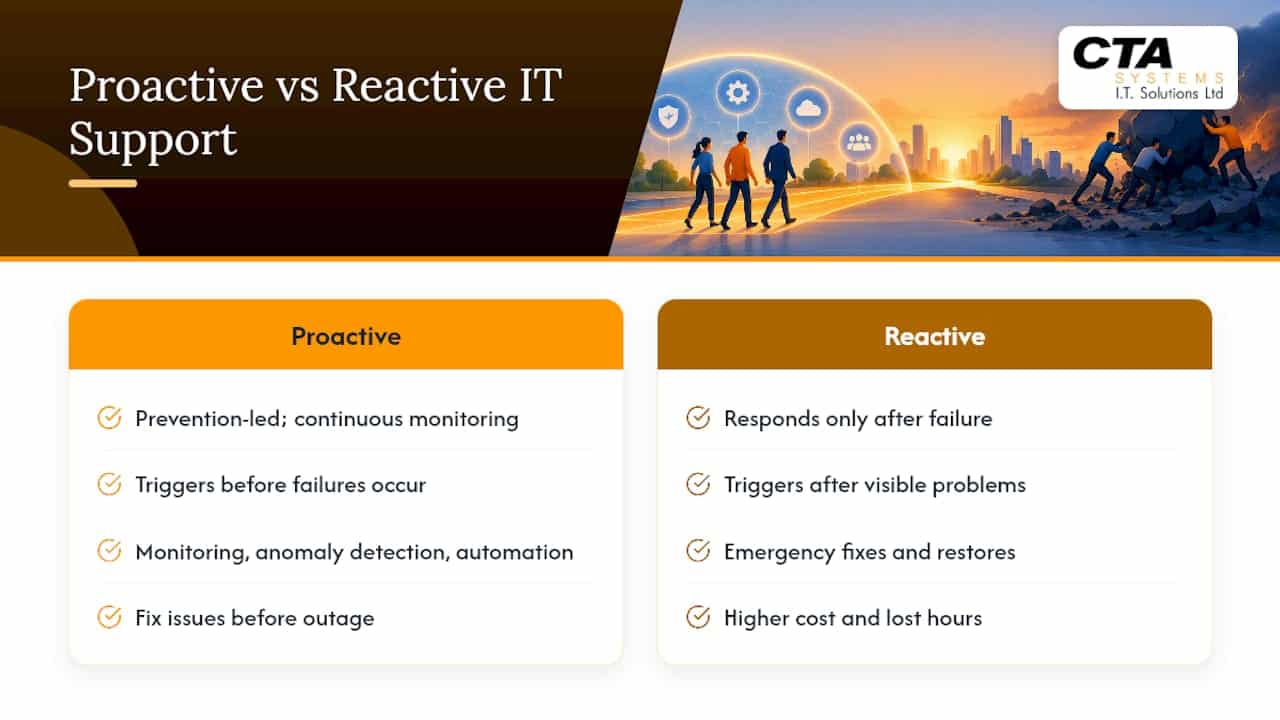
Proactive IT support is a prevention-led way of running your systems. Instead of waiting for a laptop to crash or a server to grind to a halt, it uses continuous monitoring, anomaly detection and automation to spot warning signs early and fix them before they become outages. Think of it like a gardener checking soil moisture and pulling weeds every week, rather than only turning up once the plants have already died.
Reactive support works differently. It only engages once something has visibly gone wrong: an email server is down, a shared drive won’t open, a ransomware note appears on-screen. By that point, the business is already losing productivity, and the fix often costs more in emergency labour and lost trading hours than routine maintenance ever would.
Proactive approaches genuinely help avoid the incidents that hurt SMEs most: unplanned downtime during trading hours, data loss from a failed backup nobody checked, and the operational chaos that follows a ransomware attack that spreads because nobody caught the early signs. According to New Relic’s analysis of proactive monitoring, the aim is to catch abnormal behaviour in endpoints, networks, cloud services and applications, then remediate or escalate it before anyone notices a problem at all.
Core components and proactive measures every SME should have
Proactive support isn’t one tool. It’s a set of building blocks that work together, each covering a different failure point in your IT environment.
- Monitoring and observability: dynamic baselines and synthetic tests catch problems earlier than fixed thresholds, because they learn what “normal” looks like for your systems rather than firing alerts at arbitrary limits.
- Patch and configuration management: software should be kept up to date automatically where possible, with a documented process for handling exceptions such as legacy applications that can’t be patched immediately.
- Backup and tested recovery: backups need a defined scope, a regular cadence and, crucially, restore tests that prove the data actually comes back.
- Endpoint protection and layered security: EDR or MDR tools alongside email filtering catch threats that basic antivirus misses.
- Automation of routine tasks: scripted maintenance and documented runbooks reduce the chance of manual error during repetitive jobs.
- User access controls: multi-factor authentication and least-privilege permissions limit what an attacker can do even if a password is compromised.
Modern monitoring goes beyond static alerts. New Relic’s guidance on proactive monitoring notes that dynamic baselines, predictive alerting and synthetic tests detect problems earlier than fixed thresholds and cut down on false alarms, giving your team time to act before customers ever notice.
The Cyber Essentials technical requirements reinforce several of these points directly, calling for software to be kept up to date, multi-factor authentication to be applied where available, and unnecessary or unused accounts to be removed promptly.
How to implement proactive IT support: a practical step-by-step plan for SMEs
Moving from reactive to proactive doesn’t need a big-bang project. It works best as a sequence of small, deliberate steps.
- Run a quick asset inventory. List every device, server and cloud service you rely on, then rank them by how much damage their failure would cause.
- Set up monitoring and synthetic tests. Focus first on the user journeys that matter most, such as email, invoicing or your customer-facing website.
- Implement patching and backups with an exception process. Automate what you can, and keep a written record of anything that can’t be patched immediately and why.
- Rehearse restore and incident playbooks. Assign named roles so everyone knows who does what during an incident, following the approach the NCSC’s response and recovery guidance recommends.
- Automate routine maintenance. Schedule regular reviews so the system doesn’t drift back into a reactive pattern once the initial push is over.
- Iterate using KPIs. Use what you measure to refine monitoring rules, patch windows and response times over time.
Pro Tip: Start with your three most business-critical systems rather than trying to monitor everything at once; you’ll learn faster and avoid alert overload.
How to measure success: KPIs, reporting and what good looks like
You can’t manage what you don’t measure, and proactive support is no exception. A handful of metrics tell you whether the model is actually working.
- Mean time to detect (MTTD) and mean time to resolve (MTTR) show how quickly issues are spotted and fixed.
- Percentage of successful backups and restore time shows whether your recovery plan would actually work under pressure.
- Prevented-incident counts and uptime give a sense of the problems that never became outages.
Reports and dashboards should show these figures over time, not just a snapshot, so you can spot trends before they become patterns worth worrying about.
Alert quality matters as much as alert volume. New Relic’s research on proactive monitoring points out that dynamic baselines, synthetic test coverage and cross-service correlation are what separate genuinely useful alerts from noise that gets ignored.
How to choose an external provider and what to put in the contract
Choosing a provider for proactive support is really a due diligence exercise. Ask for evidence, not promises.
- Coverage and monitoring hours: confirm exactly when systems are watched and by whom.
- Backup and restore reports: ask to see proof that restores are actually tested, not just that backup jobs “ran”.
- Patching policy: find out how exceptions are tracked and how quickly critical vulnerabilities are addressed.
- Escalation and ownership: check who is responsible for each stage of an incident and how quickly they respond.
Your contract should spell out clear inclusions and exclusions, SLAs tied to the KPIs above, and documented incident roles with named contacts. The NCSC’s guidance on backing up data is a useful benchmark here: it recommends regularly testing that backups are recent and restorable, not simply assuming they are because a job completed.
Pro Tip: Ask any prospective provider for a sample report before you sign anything; if it doesn’t show restore tests and named contacts, keep asking questions.
Practical checklist and how CTA Systems approaches proactive support
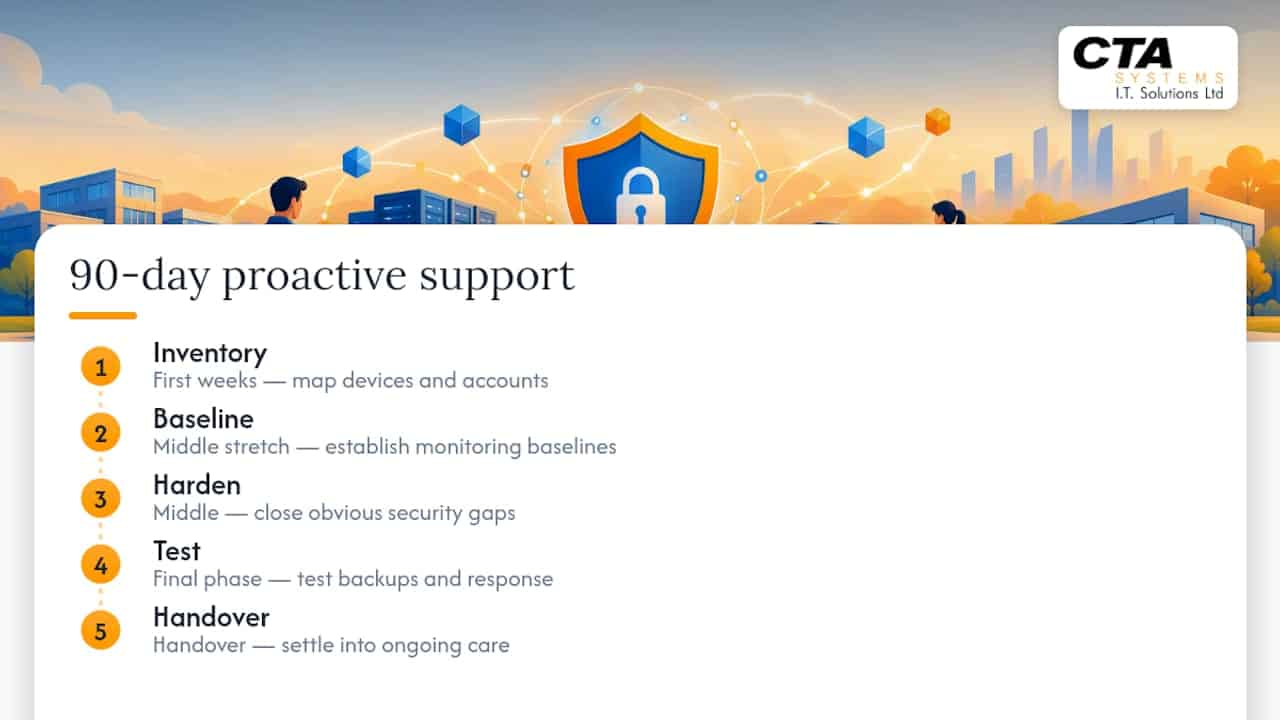
Proactive IT support can be built around a simple 90-day template: inventory, baseline, harden, test, then handover. The first weeks map every device and account; the middle stretch establishes monitoring baselines and closes obvious gaps; the final phase tests backups and incident response before settling into ongoing care.
This mirrors the steps outlined above, but with the discipline of doing it for other businesses every day. The services behind it, including remote monitoring, managed backups and Microsoft 365 support, can function as an outsourced IT department rather than a bolt-on extra.
Author perspective: why SMEs should prioritise proactive support now
Predictable costs beat surprise invoices, and prevention beats firefighting every time. If you take one thing from this guide, make it a quick audit of your current backups and patching this week.
— Will
How CTA Systems can help: managed proactive IT support and next steps

Some providers offer direct access to technicians who already know your systems, rather than a call centre reading from a script. An initial engagement often starts with an audit and baseline of your current setup, then moves to a fixed monthly plan covering monitoring, backups and Microsoft 365 support, helping keep costs predictable while managing risks.
If that sounds like the shift your business needs, take a look at managed IT support or compare fixed-price Care Plans to see which fits your setup.
Sources
- Proactive monitoring tools: stop reacting to incidents after they happen | New Relic
- Cyber Essentials requirements for IT infrastructure v3.2 — NCSC
FAQ
What is proactive IT support?
Proactive IT support is a prevention-led approach that continuously monitors systems, applies patches and tests backups to catch problems before they cause downtime. It contrasts with reactive support, which only responds once something has already broken.
What does proactive support mean in practice?
In practice, it means ongoing monitoring with dynamic baselines and synthetic tests, according to New Relic’s guidance, combined with routine patching, tested backups and documented incident roles. The goal is to fix small issues before they grow into outages.
What is Proactiv Technologies?
This isn’t a recognised term in the IT support industry, and it doesn’t relate to the proactive IT support model discussed in this guide. If you’re researching a specific company by that name, it’s worth checking directly with them for accurate details.
What is proactive cybersecurity?
Proactive cybersecurity applies the same prevention-led thinking to security specifically: monitoring for unusual activity, controlling access with multi-factor authentication and removing unnecessary accounts. The Cyber Essentials technical requirements set out several of these controls directly, including keeping software updated and managing device privileges.
How do I start moving from reactive to proactive IT support?
Start with a quick asset inventory and risk ranking, then set up monitoring for your most business-critical systems first. From there, layer in automated patching, tested backups and a documented incident plan with named roles, following the structure the NCSC’s recovery guidance recommends.


