

Business continuity keeps your business operating through disruption; disaster recovery restores the IT systems that support those operations. Business continuity sets out what “acceptable” looks like and who makes decisions during a crisis, while disaster recovery delivers the technical fix, measured against recovery time and recovery point targets. You need both: continuity planning decides what matters most, and recovery planning gets the technology back under it.
TL;DR:
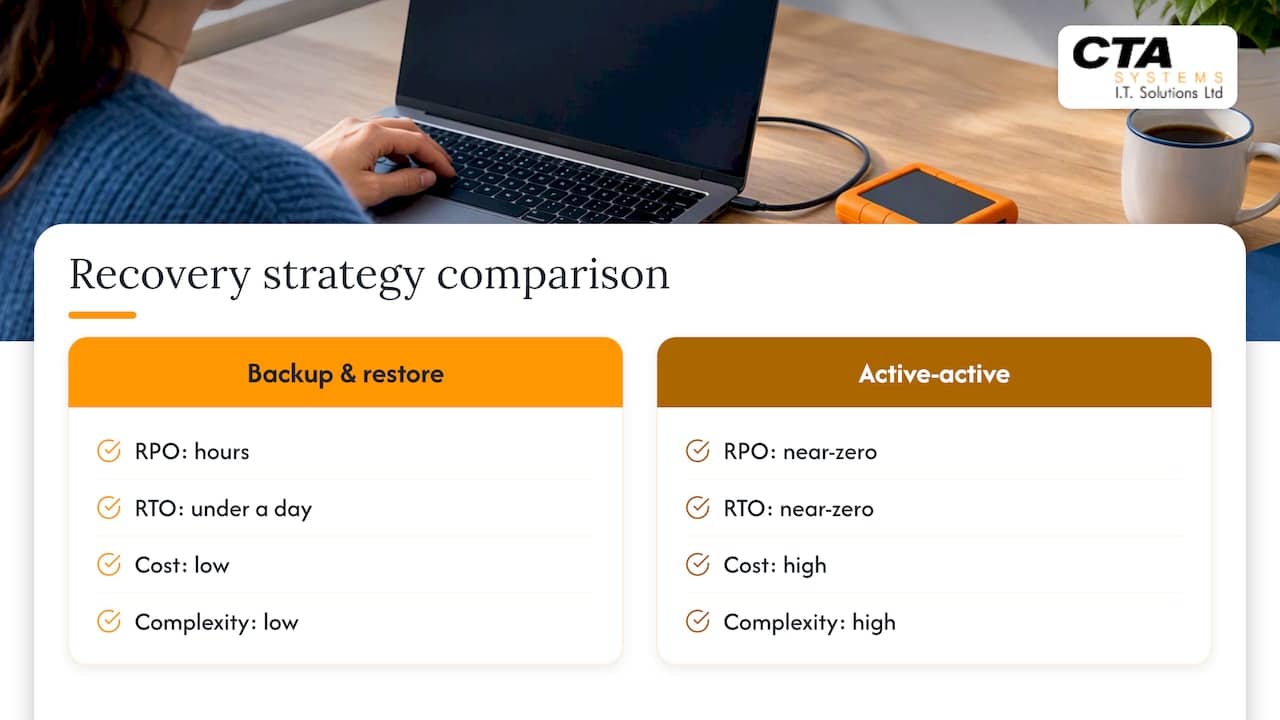
- Set separate RTO and RPO targets for each system; simple backup and restore typically means an RPO of hours and an RTO under a day.
- Near zero recovery targets require continuous replication and duplicate infrastructure, so SMEs should reserve that costly, complex approach for genuinely critical systems.
- Start with the three or four most critical services, assign business and IT owners, then test through tabletop exercises before technical restores.
- After cyber incidents, verify backups and reconnect systems in phases only after assurance; recovery can take weeks or months, with manual records reconciled afterward.
- For a small team, keep three backup copies across two media types with one offsite, and review backup health for 30 minutes monthly.
Table of Contents
- What business continuity is: scope, outcomes and ownership
- What disaster recovery is: IT focus, activities and ownership
- Key differences and how the two relate in practice
- Core components to include in a BCP and a DRP
- RTO and RPO explained and how to choose sensible targets
- How to build, test and maintain your BCP and DRP: a practical sequence
- What UK guidance means for recovery planning
- Practical SME checklist and quick wins
- Where SMEs should start investing for continuity
- How we can help with continuity and recovery planning
- FAQ
- Sources
- Primary guidance and standards to read next
What business continuity is: scope, outcomes and ownership
Business continuity planning, often shortened to BCP, is the organisation-wide discipline of keeping essential services running when something goes wrong, whether that’s a cyber incident, a power cut, or a supplier failure. Business continuity management (BCM) is the ongoing programme that keeps those plans current, tested and owned by the right people. It covers far more than IT: it protects service delivery to customers, regulatory and compliance obligations, and the cashflow that keeps the business solvent while the disruption runs its course.
Ownership typically sits with senior management or a nominated continuity lead, supported by department heads who understand their own critical processes. IT is one contributor among several, not the sole author.
Non-IT continuity measures often matter just as much as technology fixes:
- Manual order-taking or invoicing when systems are down.
- Temporary relocation to an alternative site or remote working arrangements.
- Pre-agreed staff cover and escalation contacts for key roles.
- Supplier and customer communication templates ready to send within the hour.
What disaster recovery is: IT focus, activities and ownership
Disaster recovery, delivered through a disaster recovery plan (DRP), is the technical half of the picture. It’s the set of processes that restore IT systems, applications and data after an outage, and it exists to serve the priorities that business continuity has already set.
Typical DRP activities are specific and sequenced:
- Restoring data from backups to a known-good point.
- Failing over to standby servers or cloud infrastructure.
- Rebuilding systems from images or configuration templates.
- Reconnecting networks and applications in a tested order rather than all at once.
Ownership usually sits with IT managers or an external support partner, often working alongside cloud vendors and, for serious cyber incidents, specialist cyber incident response (CIR) providers. Where business continuity asks “what do we need running, and by when?”, disaster recovery answers “how do we actually get it there?”
Key differences and how the two relate in practice
The clearest way to separate the two is scope: business continuity covers the whole organisation, people, premises, suppliers and processes included, while disaster recovery focuses specifically on IT systems and data. Timeframes differ too: continuity plans often span days or weeks of adapted operation, whereas recovery plans are measured in the hours or minutes defined by recovery targets.
Picture a ransomware attack that takes down your main file server:
- From a business continuity view, the priority is keeping orders flowing, perhaps through a paper-based workaround, and telling customers what to expect.
- From a disaster recovery view, the priority is isolating the infected systems, restoring clean backups and verifying integrity before reconnecting anything.
- The two meet when IT confirms recovery timescales and business leaders decide which services get restored first.
Disaster recovery effectively sits inside business continuity. Sequencing matters because reconnecting systems in the wrong order, or before they’ve been verified as clean, can undo the progress continuity planning has protected.
Core components to include in a BCP and a DRP
A usable BCP rests on a handful of documented pieces:
- A business impact analysis (BIA) identifying which services, if lost, would cause the most damage.
- A list of critical services ranked by recovery priority.
- Clear communication plans for staff, customers and suppliers.
- Supplier continuity arrangements, including backup suppliers where single points of failure exist.
A DRP needs its own technical artefacts:
- A documented backup policy covering frequency, location and retention.
- Agreed RTO and RPO figures for each critical system.
- Step-by-step runbooks for restoring each major application.
- Failover architecture details and a routine for checking data integrity after restoration.
The overlap between the two documents is where dependencies live: a BCP that names “order processing” as critical is only useful once the DRP maps that service to the specific servers, backups and recovery steps that bring it back.
RTO and RPO explained and how to choose sensible targets
Recovery time objective (RTO) is the acceptable maximum downtime for a system before the business suffers serious harm. Recovery point objective (RPO) is the maximum acceptable data loss, measured from the last good backup in time. Both should be defined individually for each system, rather than as a single aggregate figure for the entire business.
Recovery strategy shapes what’s achievable. According to Microsoft’s disaster recovery design guidance, a simple backup-and-restore approach typically delivers an RPO measured in hours and an RTO measured in under a day, while a multi-site active-active setup can bring both very close to zero. The trade-off is cost and complexity: near-zero RPO and RTO demand continuous replication and duplicate infrastructure, which carries a higher price and greater complexity than periodic backups. For most SMEs, the sensible approach is to reserve the tightest targets for genuinely critical systems and accept longer, cheaper recovery windows for everything else.
Our RTO vs RPO guide for SMEs walks through picking a single starting metric in four practical steps.
How to build, test and maintain your BCP and DRP: a practical sequence
Plans only earn their keep once they’ve been tested, so treat this as a cycle rather than a one-off project.
- Run a short business impact analysis. Identify your three or four most critical services and name an owner for each, both on the business side and the IT side.
- Set RTO and RPO targets, then choose your recovery approach. Match backup frequency and failover arrangements to those targets and write the steps down as runbooks that someone other than you could follow.
- Test progressively. Start with a tabletop exercise talking through a scenario, move to technical restore tests of individual systems, and work up to a full rehearsal that mimics a real outage.
- Build in communications and supplier checks. Confirm that contact lists are current and that key suppliers have their own continuity arrangements, then update your plans with whatever the test revealed.
After any workaround period, reconcile data created manually, such as paper orders or spreadsheet logs, back into restored systems before declaring normal operations resumed. Skipping this step is one of the most common reasons recoveries drag on longer than expected.
Pro Tip: Run your first tabletop exercise in under an hour by picking one realistic scenario, such as “our main server is unreachable,” and simply asking each department what they’d do in the first 30 minutes.
For a focused starting point, our guide to protecting your three critical systems sets out exactly where small teams should begin.
What UK guidance means for recovery planning
Recovery guidance from the National Cyber Security Centre treats recovery from a serious cyber incident as a coordinated programme, not a single IT task. The goal is minimum viable operations: the smallest set of services that lets the business function, prioritised by business need rather than technical convenience.
Reconnection should be phased and backed by assurance at each stage. The G7 cyber expert group’s reconnection framework sets out a disconnect, assess, remediate, assure, reconnect, recover sequence designed to stop systems being reconnected before they’re genuinely clean.
Practical points worth building into your own plans:
- Treat backups as something to verify and trust, not assume are fine.
- Expect major incident recovery to take weeks or months, not days.
- Plan for data reconciliation and clear governance throughout the process.
Practical SME checklist and quick wins
Small, consistent habits do more for resilience than any lengthy document. Run a hybrid 3-2-1 backup (three copies, two media types, one offsite), review backup health for 30 minutes every month, and keep one short runbook covering your top three services. A 15-minute morning tabletop, walking through “what if this went down today”, quickly reveals whether roles and contact details actually work. The most common SME trap is treating backups as “set and forget”: a small investment in testing prevents a very large outage later. Our guide to 3-2-1 hybrid backup for ransomware protection covers the setup in more detail, and for online stores, this overview of backup plugins is a useful reference for plugin-level options.
Where SMEs should start investing for continuity
If budget and time are tight, start with backups and communications: they protect cashflow and customer delivery fastest. Consider bringing in managed IT support once testing reveals gaps you can’t close alone, aiming to prioritise prevention over firefighting.
— Will
How we can help with continuity and recovery planning
We build business continuity and disaster recovery support around what already works for your business, rather than replacing it. Through Managed IT Support, Remote Monitoring & Management and our Care Plans, we keep backups verified, systems monitored and runbooks current, so recovery targets are more than numbers on a page.

- Managed IT support for day-to-day monitoring and proactive issue prevention.
- Remote monitoring and management to catch problems before they cause downtime.
- Backup and recovery and data recovery services built around your recovery time and recovery point objectives.
- Care plans for predictable, fixed monthly costs.
If you’d like a second opinion on your current plans, get in touch for a review call and we’ll talk through where the gaps are.
FAQ
What is the main difference between BCP and DRP?
A business continuity plan (BCP) covers the whole organisation and focuses on keeping essential services running during disruption. A disaster recovery plan (DRP) is narrower, focusing specifically on restoring IT systems and data to meet agreed recovery targets.
What is the difference between BCP and BCM?
A BCP is the document itself, setting out priorities, roles and procedures for a specific organisation. Business continuity management (BCM) is the ongoing programme, including testing, reviewing and updating, that keeps that plan current and workable.
What are the 4 C’s of disaster recovery?
Definitions vary across providers, so there’s no single agreed standard for “the 4 C’s” in official guidance. What matters more in practice is having clear ownership, tested runbooks, and agreed recovery targets for each critical system.
Can you provide an example of a disaster recovery and business continuity plan?
A simple example: if a server fails, the DRP specifies restoring from the latest verified backup within an agreed RTO, while the BCP covers how staff keep serving customers manually in the meantime, such as logging orders on paper until systems are back. Testing both together, through a tabletop exercise, reveals whether the two plans actually work in practice.
Sources
- Disaster recovery and business continuity design guide – Microsoft Learn
- What to do when cyber attacks disrupt your organisation – NCSC
- Gov
- ISO/IEC 27031 — International Organization for Standardization
Primary guidance and standards to read next
For detailed procedures beyond this overview, these are the primary sources worth reading directly. The National Cyber Security Centre’s guidance on what to do when cyber attacks disrupt your organisation sets out the recovery programme approach in full, while its companion guidance on preparing for a highly disruptive cyber incident covers the preparation side. The G7 reconnection framework technical annex details the phased reconnection process referenced above. For the technical metrics, Microsoft’s disaster recovery design guide explains RTO and RPO alongside recovery architecture options, and ISO/IEC 27031 provides the formal standard for ICT readiness within wider business continuity planning.


