

Run backup verification and overnight alert checks frequently, patch review and log checks regularly, firmware and full updates on a consistent monthly basis, disaster recovery testing periodically, and a full infrastructure audit once per year. Start today by building a tiered equipment inventory and assigning an owner to each recurring task. Everything below turns that into a template you can copy this afternoon.
TL;DR:
- Small offices should build a detailed inventory, assign task owners, and automate reminders to ensure routine IT maintenance is consistent and accountable.
- Tiering systems by importance helps prioritize daily to quarterly tasks, with mission-critical systems requiring more frequent checks and updates.
- Regular monthly reviews focus on overdue tasks, patch status, backups, incident recurrence, and aging hardware to prevent emergency failures.
- External partners can effectively manage off-hours monitoring, patching, and reporting, especially for small teams lacking around-the-clock coverage.
- Proactive monitoring and fixed monthly costs from providers like CTA Systems help small businesses maintain reliable IT operations without overload or unexpected downtime.
Table of Contents
- What should your IT maintenance schedule cover?
- Which systems need tighter maintenance cycles?
- How do you build, assign and automate the schedule?
- What does a 30-minute monthly maintenance review look like?
- What do NIST and FFIEC actually recommend?
- Keeping maintenance in-house versus handing it to a partner
- How CTA Systems can help you keep to a maintenance schedule
- Sources
- FAQ
What should your IT maintenance schedule cover?
An operational study on routine maintenance links a large share of critical incidents to skipped or inadequate routine work, which is exactly why a written schedule beats “we’ll get to it” every time. The point isn’t to fill a spreadsheet with tasks nobody reads. It’s to give each recurring job a frequency, an owner, and a place to record that it happened.
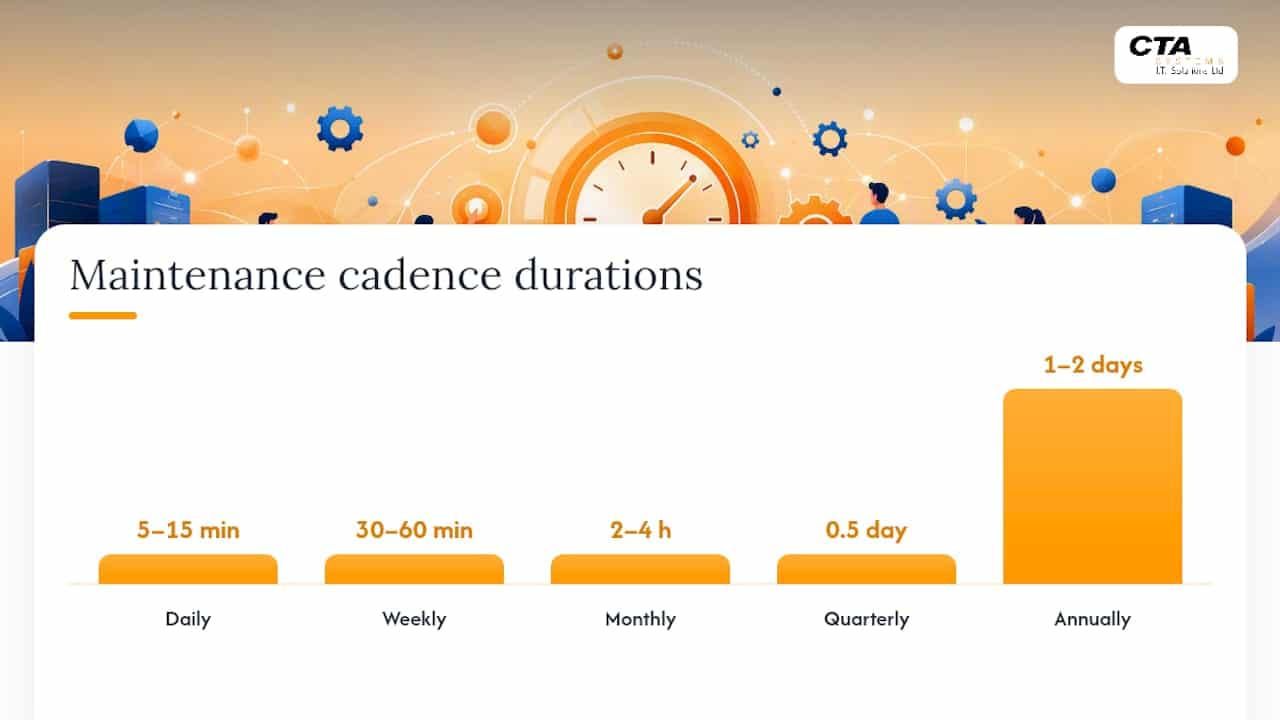
Here’s a template you can adapt directly. Copy the columns (task, owner, frequency, expected duration, notes) into a shared sheet or your ticketing tool and populate it with your own kit.
Daily (5 to 15 minutes)
- Confirm last night’s backup completed and check for failure alerts.
- Review overnight monitoring dashboards for anything flagged red or amber.
- Spot check server and network device availability.
Weekly (30 to 60 minutes)
- Review the patch backlog across servers, workstations and network gear.
- Check capacity trends (disk, memory, bandwidth) for early warning signs.
- Review security and system logs for repeated errors.
- Tune alert thresholds that generated noise during the week.
Monthly (2 to 4 hours)
- Apply bundled firmware and OS updates during a planned window.
- Review performance metrics against baseline.
- Run a test restore from backup to confirm recoverability, not just completion.
Quarterly (half a day)
- Test failover and disaster recovery procedures end to end.
- Physically inspect hardware, cabling and UPS units.
- Check warranty status and flag anything nearing end of service life.
Annually (1 to 2 days)
- Run a full infrastructure and security audit.
- Revisit capacity planning against business growth.
- Review vendor contracts, licensing, and support agreements.
This cadence mirrors what most managed IT providers use as a baseline for mixed environments, and it scales up or down depending on how critical each asset is, which is the next problem to solve.
Which systems need tighter maintenance cycles?
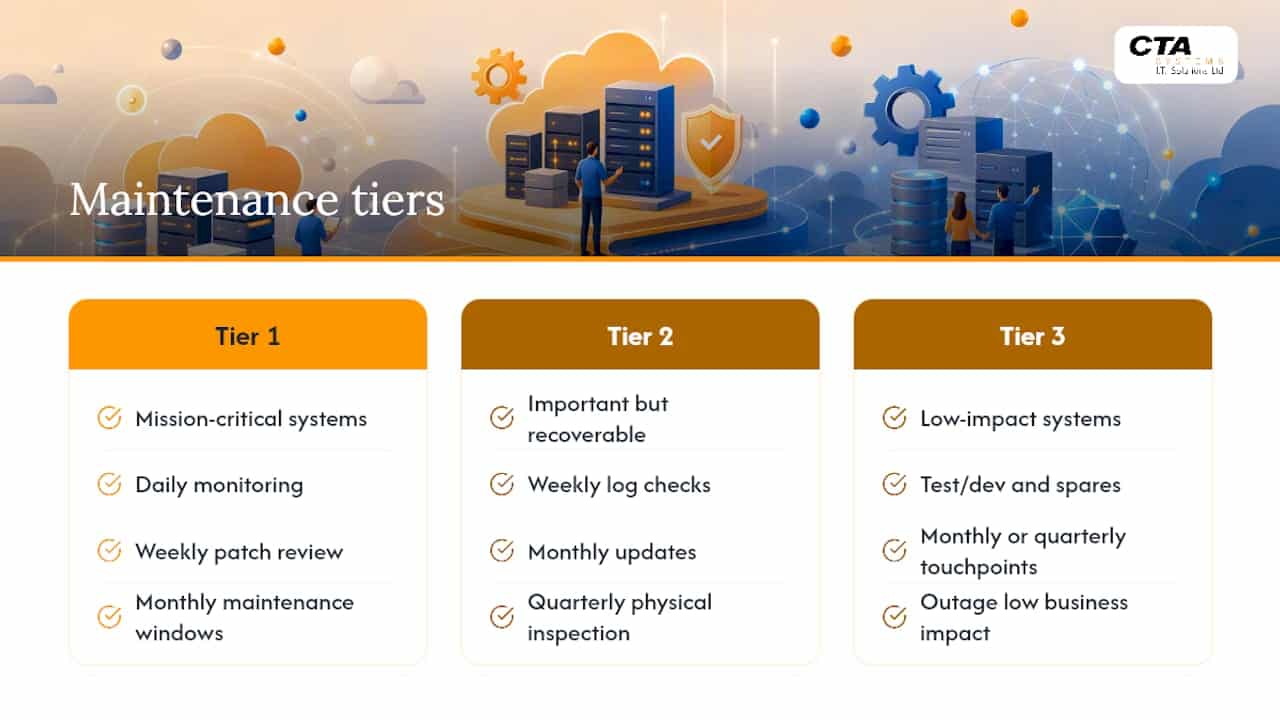
Not every device deserves the same attention. A production database going down costs you far more per hour than a spare laptop in the stationery cupboard, so your schedule should tier equipment by consequence, not convenience.
Tier 1: mission-critical. Primary databases, core network switches, the main file server, your email and Microsoft 365 tenant. These need daily monitoring, weekly patch review with expedited testing, and monthly maintenance windows at minimum. Any anomaly here justifies an immediate off-cycle check rather than waiting for the next scheduled slot.
Tier 2: important but recoverable. Secondary file servers, printers, standard user workstations, VoIP handsets. Weekly log checks and monthly updates are usually enough, with quarterly physical inspection.
Tier 3: low impact. Test and development boxes, spare hardware, non-critical peripherals. Monthly or even quarterly touchpoints are fine, since an outage here rarely affects revenue or client work.
The tiering isn’t fixed forever. Once you have decent monitoring in place, some Tier 1 tasks should shift from time-based to condition-based, meaning you check when the data tells you to rather than on a fixed calendar. A hybrid approach that blends scheduled and condition-triggered maintenance tends to catch more problems with less wasted effort than either method alone. A UPS that’s throwing self-test warnings needs attention now, not at the next quarterly slot.
How do you build, assign and automate the schedule?
A schedule only works if someone owns each line item and the reminders fire without a human remembering to check.
- Inventory everything. List every server, workstation, network device, and peripheral, then tag each with a criticality tier and capture vendor, purchase date and warranty expiry.
- Define tasks per category. Map each tier’s tasks to manufacturer guidance and your patching policy, so a laptop’s checklist looks different from a switch’s.
- Assign owners and set deadlines. Every task needs one named person responsible for completion and a second person (or a monthly review) to verify it happened.
- Automate the reminders. Recurring calendar invites work for a two-person office; a ticketing or ITSM platform works better once you have more than a handful of assets, with triggers such as “warranty expires in 30 days” or “patch not applied within grace period”.
- Record and measure. Log completion dates, note anything skipped and why, and feed that record into your monthly review so patterns become visible instead of getting lost in individual memories.
Pro Tip: Set your monitoring platform’s maintenance windows deliberately, defining recurrence, target devices and duration, rather than muting alerts manually. It stops planned work from triggering false alarms and keeps your alert history clean when you’re diagnosing a real problem later.
What does a 30-minute monthly maintenance review look like?
Run this as a recurring calendar slot, not an ad hoc favour. Five steps, thirty minutes, done.
- Overdue tasks (5 minutes). Pull the list of anything not marked complete against schedule.
- Patch backlog (5 minutes). Check how many systems are behind on updates and why.
- Backup spot check (10 minutes). Pick one system at random and confirm a restore actually works.
- Repeat incident review (5 minutes). Look for the same fault appearing more than once, since that’s usually a sign the underlying cause hasn’t been fixed.
- Hardware ageing check (5 minutes). Flag anything approaching end of service life for budget planning.
Walk out with an action list, named owners, deadlines, and any budget signals worth raising with leadership. Ageing hardware nearing end of service life tends to generate the same recurring incidents month after month, so this is where you catch it before it becomes an emergency call.
What do NIST and FFIEC actually recommend?
NIST’s guide to enterprise patch management recommends organising systems into maintenance groups and using phased or canary deployments, testing patches on a small subset before wider rollout, with separate plans for routine and emergency patching. The FFIEC IT Handbook adds that preventive maintenance should align with business plans, restrict access during maintenance windows, and log every maintenance action. For a small team, that translates simply: patch a test group first, force installs once the grace period ends, and treat security emergencies as exceptions that bypass the normal queue entirely.
Keeping maintenance in-house versus handing it to a partner
Doing this well in-house is entirely possible with two or three people and real discipline. Where it usually breaks down is coverage: nobody’s watching alerts at 2am, and the person who owns patching is also the person fixing printers, so the schedule slips quietly.
That’s the gap an external partner closes, offering monitoring outside office hours, structured patch management, verified backups, and monthly reporting instead of ad hoc firefighting. It suits businesses with limited IT headcount, a need for predictable monthly costs, or infrastructure that’s outgrown what one person can watch alone.
[brand_signal: 30+ years supporting SMEs]
[brand_signal: predictable per-user/per-device pricing]
— Will
How CTA Systems can help you keep to a maintenance schedule
Building the schedule is the easy part. Keeping every task on time, every week, without it becoming one more thing on someone’s overloaded plate, is where most small offices fall behind. Proactive monitoring, managed patching, and backup verification can be run as a standing service rather than a quarterly scramble, alongside Microsoft 365 management for businesses that have outgrown ad hoc IT.

For an SME with no dedicated IT department, having a fixed monthly cost instead of an unpredictable repair bill, and a team that flags a failing disk or an overdue patch before it becomes downtime can make a practical difference. If your current schedule exists mostly as good intentions, get in touch with CTA Systems for a review of what you have now and a quote for keeping it running properly.
Sources
- NIST SP 800-40 Revision 4: Guide to Enterprise Patch Management Technologies
- FFIEC IT Handbook: Preventive maintenance
- How often should you perform IT maintenance? A practical schedule for reliability and uptime
- Preventive maintenance in IT: types, examples and software (Pandora FMS)
FAQ
What are the 7 types of maintenance?
IT and asset management commonly reference reactive, preventive, predictive, condition-based, corrective, scheduled, and risk-based maintenance. Most small offices only need two in practice: preventive (time-based, scheduled) and condition-based (triggered by monitoring data), blended as described above.
What is the typical IT maintenance schedule?
A practical baseline runs daily backup and health checks, weekly patch review, monthly firmware and OS updates, quarterly disaster recovery testing, and an annual full audit. This tiered cadence tightens for mission-critical systems and loosens for low-impact ones.
What is the 80/20 rule in maintenance?
It’s the idea that roughly 80% of failures trace back to a small share of causes, usually a handful of ageing devices or unpatched systems generating repeat incidents. Your monthly review is designed to surface exactly that pattern, so you can fix the recurring cause rather than the same symptom every month.
What is TBM and CBM in TPM?
TBM (time-based maintenance) means servicing equipment on a fixed schedule regardless of condition, while CBM (condition-based maintenance) triggers action from actual monitoring data, such as disk health or temperature readings. A hybrid of the two is generally the most efficient approach once you have decent monitoring in place.
Does CTA Systems offer managed IT maintenance for small businesses?
Yes, CTA Systems provides proactive monitoring, managed patching, backup verification, and Microsoft 365 management as an ongoing service for SMEs. Current pricing and plan details are available directly on the CTA Systems website.


