

RTO tells you how fast a system must come back online after failure. RPO tells you how much data you can afford to lose, measured in time before that failure hit. One is about speed of recovery, the other about tolerance for data loss, and getting either one wrong on its own leaves half a disaster recovery plan unwritten.
TL;DR:
- Setting an aggressive RTO, such as under 30 minutes for mission-critical systems, often requires complex active-active infrastructure and synchronous replication.
- Achieving a very low RPO, like under 15 minutes, significantly raises costs due to the need for continuous data replication and frequent backups.
- Smaller organizations should prioritize fixing either RTO or RPO based on regulatory requirements or business impact, rather than aiming for technical perfection on both.
- RTO is generally tested through recovery drills, while RPO verification depends on restoring and checking backup integrity regularly.
- Ransomware incidents can extend RTO to 24 to 72 hours and make immutable offline backups essential for meeting recovery objectives.
Table of Contents
- RTO vs RPO explained: what each one actually measures
- RTO vs RPO at a glance: the comparison that clears up confusion
- How to set RTO and RPO targets: a step‑by‑step process
- Mapping RTO/RPO targets to your disaster recovery strategy
- What realistic RTO and RPO targets look like in practice
- Testing RTO and RPO: RTA, verification, and acceptance criteria
- Why ransomware changes RTO and RPO planning
- Making RTO and RPO work for real SME budgets
- How Ctasystems supports your RTO and RPO targets
- Sources
- FAQ
RTO vs RPO explained: what each one actually measures
The National Institute of Standards and Technology defines RTO as the maximum acceptable length of time a system can stay down after a disruption, and RPO as the maximum acceptable amount of data loss, measured backwards in time to the last good copy. Both are business decisions dressed up as technical ones. IT tells you what’s feasible; the business tells you what’s tolerable.
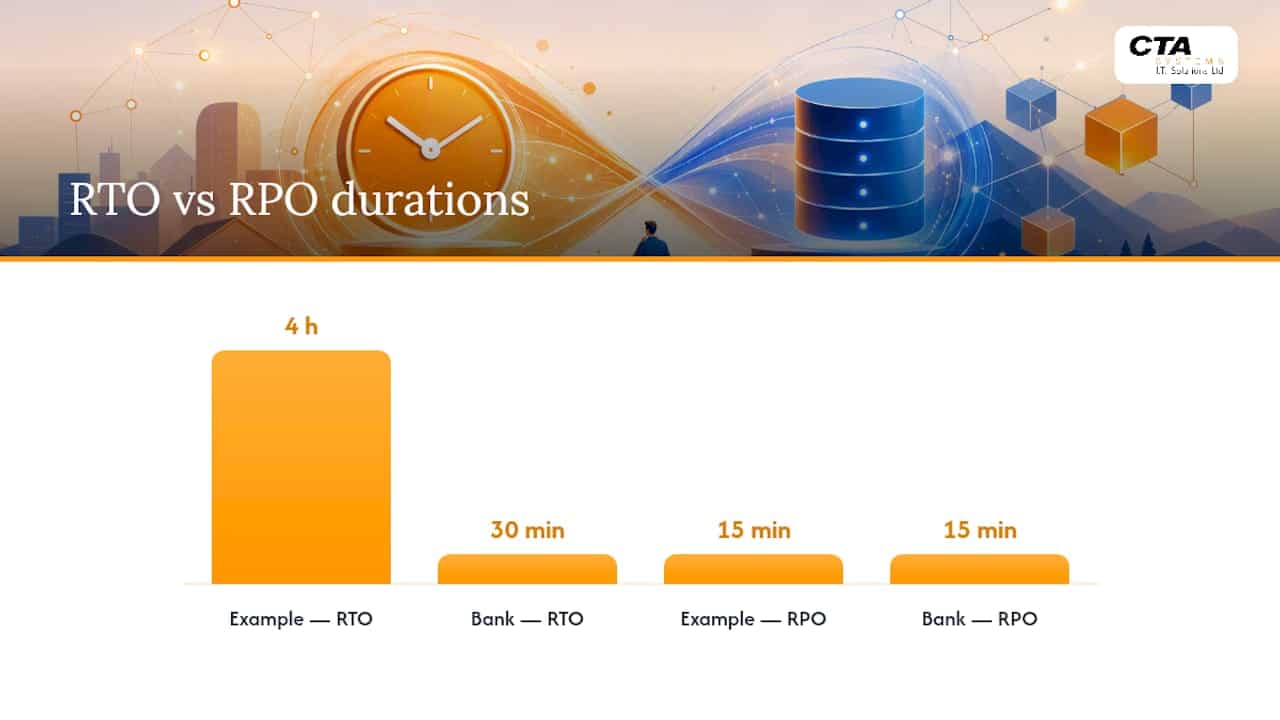
The direction of measurement is where most people trip up. RTO runs forward from the moment of the incident: the clock starts when the system goes down and stops when it’s usable again. RPO runs backwards from that same moment: it asks how far back your last valid backup or replica sits relative to when things broke. A four hour RTO means you’re back up within four hours. A fifteen-minute RPO means you lose, at most, fifteen minutes of transactions.
Ownership usually splits along the same line. Application and infrastructure teams tend to own RTO, because it’s about restoring services, provisioning failover capacity, and rehearsing runbooks. Data and backup teams tend to own RPO, because it’s about replication frequency, snapshot cadence, and backup integrity. In smaller organisations, the same person often owns both, which is exactly why the two get confused so easily.
A few concrete examples make the split obvious:
- An online shop might set an RTO of a few hours (the site must be trading again reasonably soon after an outage) and an RPO of roughly an hour (losing that amount of orders is survivable, if annoying).
- A bank’s core payments platform might run an RTO of thirty minutes and an RPO of fifteen minutes, because lost transactions mean lost money and regulatory exposure.
- A marketing website with no transactional data might accept an RTO and RPO of about a day, because nothing time sensitive lives there.
RTO vs RPO at a glance: the comparison that clears up confusion
Put side by side, the two metrics stop looking like synonyms and start looking like what they are: different questions with different owners and different price tags.
| Attribute | RTO | RPO |
|---|---|---|
| What it measures | Time to restore service after an incident | Maximum tolerable data loss, measured in time |
| Direction of measurement | Forward from the incident | Backward to the last valid recovery point |
| Typical unit | Minutes to hours (sometimes days) | Seconds to hours |
| Typical owner | Infrastructure/application teams | Backup/data teams |
| Main technical enablers | Failover automation, standby infrastructure, runbooks | Backup frequency, replication, snapshot cadence |
| Cost/complexity impact | Rises sharply as target approaches zero | Rises sharply as target approaches zero |
| How it’s tested | Recovery drills, measuring RTA against RTO | Recovery point verification, checksum/integrity checks |
Two things fall out of this table immediately. First, cost doesn’t scale in a straight line with either metric. Pushing RTO from four hours to thirty minutes might mean a new architecture tier entirely, not a tweak to an existing one. TechTarget’s analysis puts it plainly: as targets get more aggressive, both cost and architectural complexity rise sharply, because near-zero RTO or RPO usually demands active-active infrastructure and synchronous replication.
Second, you can’t optimise one metric in isolation. A brilliant RPO built on constant replication is wasted if your failover process takes six hours to actually switch traffic over, and the reverse is just as true.
Pro Tip: If you only have budget to fix one metric this year, fix whichever one sits closer to a regulatory or contractual deadline. Payment processors and healthcare data handlers often have RPO written into compliance obligations before RTO ever comes up.
How to set RTO and RPO targets: a step‑by‑step process
Setting realistic targets is a business exercise that IT supports, not the other way round. Skip the business impact analysis (BIA) and you’ll end up with numbers plucked from a vendor brochure rather than your own risk profile.
- Map processes to systems. List every critical business process, then trace which applications, databases, and infrastructure each one depends on. A single “order processing” process might touch five separate systems.
- Quantify the impact of downtime. For each process, calculate the Maximum Tolerable Downtime (MTD), the cost of an hour offline, and separately, the cost of recreating lost data manually versus the cost of continuous replication. TechTarget’s guidance recommends setting RTO slightly below MTD, leaving an operational buffer rather than cutting it fine.
- Draft initial ranges and take them to stakeholders. Present a range, not a single number, and ask finance, compliance, and application owners whether it matches their tolerance for disruption.
- Get formal sign-off. Document who agreed to which target and when, because RTO/RPO figures without an owner tend to drift into aspiration rather than commitment.
A short worksheet helps keep this honest. For each process, record: the process name, the systems it depends on, cost of one hour down, cost of one hour of lost data, proposed RTO, proposed RPO, and the name of the stakeholder who signed off. Sample questions worth asking in that sign-off conversation: “What happens to revenue if this is down for four hours instead of one?” and “Could we manually reconstruct lost transactions from paper records or supplier logs, and how long would that take?”
Business stakeholders should drive these decisions, since they carry the financial and reputational risk. IT’s job is to supply feasibility and cost estimates as constraints on the conversation, not to set the targets unilaterally.
Pro Tip: Treat IT feasibility and cost as boundaries on the discussion, never as the reason a target gets chosen. “We can’t do better than four hours without a six-figure spend” is useful information. It should never be the sentence that ends the conversation.
Mapping RTO/RPO targets to your disaster recovery strategy
Once you have target numbers, the architecture almost chooses itself. AWS’s guidance on disaster recovery maps four broad strategies to four bands of ambition, and picking the least complex one that still hits your numbers keeps cost under control.
- Backup & Restore: the simplest and cheapest approach, restoring from backups stored off-site or in the cloud. RTO typically runs from several hours to 24+ hours, and RPO depends entirely on backup frequency, often hours. Suits low-priority systems where a day’s downtime is tolerable.
- Pilot Light: a minimal version of your environment sits idle in a secondary location, ready to scale up when needed. RTO drops to minutes or a few hours; RPO improves to minutes, since core data is replicated continuously while compute stays dormant.
- Warm Standby: a scaled-down but fully functional copy of your environment runs continuously, ready to take full load quickly. RTO shrinks to minutes; RPO can reach seconds to minutes, because replication is near-continuous.
- Multi-Site Active-Active: two or more environments run live traffic simultaneously, so failover is nearly instantaneous. RTO and RPO both approach zero, at the cost of synchronous replication, conflict resolution, and infrastructure that runs twice.
The trade-off is a curve, not a straight line. Moving from Backup & Restore to Pilot Light is a modest cost increase. Moving from Warm Standby to Active-Active is a different order of spend entirely, because you’re now running duplicate production infrastructure permanently rather than scaling it up on demand. Choose the strategy that meets your BIA-derived targets, not the most impressive one on paper.
What realistic RTO and RPO targets look like in practice
Numbers mean little without context, so here’s how targets typically tier across a business, from systems that can’t fail to ones that barely matter:
- Tier 1: mission-critical. Payment gateways, authentication services, core transactional databases. Typical targets: RTO under 30 minutes, RPO under 15 minutes. These usually run on Warm Standby or Active-Active architecture.
- Tier 2: important but not existential. CRM systems, internal ERP, email. Typical targets: RTO of 2 to 4 hours, RPO of 1 hour. Pilot Light often fits here comfortably.
- Tier 3: non-critical. Marketing websites, internal wikis, archived reporting tools. Typical targets: RTO of 24 hours or more, RPO of 24 hours. Backup & Restore is usually sufficient and considerably cheaper.
A worked example shows how the maths actually plays out. Say an online retailer calculates that its ordering platform loses £2,000 in revenue per hour of downtime, and reconstructing an hour of lost orders manually from payment logs costs roughly £500 in staff time. Against continuous replication costing £3,000 a month, the business decides an RPO of 30 minutes is worth paying for, since two outages a year at the old one-hour RPO would already cost more than the replication bill. It’s worth noting that not every incident is an infrastructure failure. LaunchDarkly’s analysis points out that many outages stem from application bugs rather than hardware or network failure, and feature flags can let teams roll back a bad release in seconds, effectively giving certain incident types a far tighter RTO than the infrastructure alone would suggest.
Testing RTO and RPO: RTA, verification, and acceptance criteria
A target on paper means nothing until you’ve measured it against reality. That’s where Recovery Time Actual (RTA) comes in: the real, measured time a recovery took, checked against the RTO you committed to. Practitioners are clear that an objective and an actual measured result are different things, and the gap between them is exactly what testing is meant to close.
- Run scheduled recovery drills. Fail over a non-production copy of a critical system and time the whole process, start to finish, recording RTA against the target RTO.
- Verify recovery point integrity. Don’t just confirm a backup exists; restore it and check the data is complete, uncorrupted, and current enough to meet the RPO commitment.
- Hold table-top ransomware exercises. Walk through a simulated ransomware incident on paper, including forensic and eradication steps, to test whether your RTO assumptions hold when the cause of the outage is malicious rather than mechanical.
- Log every gap between RTA and RTO. A test that reveals a four hour RTA against a two hour RTO isn’t a failure, it’s the whole point of testing. Fix the gap before the real incident finds it.
Non-disruptive testing (failing over to an isolated copy rather than production) keeps this cheap enough to run quarterly rather than once a year.
Why ransomware changes RTO and RPO planning
Ransomware breaks the clean assumptions behind most RTO/RPO planning. A hardware failure has a known cause and a known fix; a ransomware attack means you can’t simply restore the most recent backup, because that backup might already be encrypted or contain the same vulnerability that let the attacker in. Guidance from the Cybersecurity and Infrastructure Security Agency recommends forensic analysis and verification of clean recovery points before restoration begins, which routinely stretches RTO out to 24 to 72 hours in real incidents, even for organisations with fast recovery on paper.

This is why immutable backups and air-gapped copies matter so much more for RPO than a simple snapshot schedule. If every copy of your data sits on the same network the attacker compromised, your “recovery point” might be worthless.
Pro Tip: Keep at least one backup copy genuinely offline or immutable, and test restoring from it specifically, not just from your fastest, most connected backup. The backup you never test against a ransomware scenario is the one that fails when you need it most.
Making RTO and RPO work for real SME budgets
Most of the frameworks written about RTO and RPO assume enterprise budgets and dedicated DR teams. SMEs rarely have either, which means prioritisation matters more than perfection. The honest move is to identify the one or two systems where downtime genuinely threatens the business, fund those to a proper standard, and accept longer recovery windows everywhere else.
Remote monitoring changes the maths here more than people expect. Catching a failing disk or a stalled backup job before it becomes an outage does more for your effective RTO than any amount of architecture, because the incident that never happens has an RTO of zero. Reliable, tested backups matter just as much for RPO. A backup schedule nobody has verified in six months isn’t a recovery point, it’s a hope.
— Will
How Ctasystems supports your RTO and RPO targets
Turning a target on a whiteboard into a system that actually meets it is where most SMEs get stuck, and that’s the gap Ctasystems exists to close. Rather than selling you a generic disaster recovery package, Ctasystems builds the underlying support that keeps your RTO and RPO numbers honest: managed IT support that catches problems before they become outages, remote monitoring and management that shortens the gap between failure and detection, and backup and recovery services built to survive a ransomware event, not just a hard drive failure.

If you’re not sure whether your current backup schedule would actually meet the RPO your business needs, or whether your team could hit its stated RTO under real pressure, that’s exactly the conversation worth having before an incident forces it. Ctasystems’ Care Plans build ongoing monitoring, backup verification, and proactive maintenance into a fixed monthly cost, so your recovery targets rest on tested infrastructure rather than assumptions. Get in touch for a technical assessment and find out where your current setup stands against the numbers your business actually needs.
Sources
- NIST glossary: recovery time objective
- AWS glossary: RTO and RPO
- TechTarget: RPO vs RTO
- Splunk: RPO vs RTO
FAQ
What is the difference between RTO and RPO?
RTO is how long a system can stay down before the outage becomes unacceptable, measured forward from the incident. RPO is how much data you can afford to lose, measured backward to your last valid recovery point, as NIST’s glossary defines both terms.
What is the difference between RTO and RPO data?
RTO doesn’t measure data at all; it measures downtime, the time a service is unavailable. RPO specifically measures data loss, expressed as a time gap between the last good backup or replica and the moment of failure.
How do you calculate RPO?
RPO comes from weighing the cost of recreating lost data manually against the cost of more frequent backups or continuous replication, a calculation TechTarget’s guidance ties directly to business impact analysis. A payments system might justify a 15 minute RPO through continuous replication, while a marketing site might settle for 24 hours of nightly backups.
Can RTO be greater than RPO?
Yes, and in most real systems it is, since RTO and RPO measure different things and there’s no mathematical rule tying one to the other. What can’t happen is recovering to a point in time faster than the recovery process itself takes, so a very tight RPO still needs an RTO long enough to actually complete that recovery.


