

The fastest way to reduce exploitable risk is a risk-based, automated patch programme governed by explicit SLAs and per-asset maintenance groups. That means prioritising by exploitability rather than CVSS score alone, automating routine deployment, and giving every device group a documented maintenance plan, exactly the model NIST outlines in SP 800-40r4. Get those three elements right and the rest of your patch management practice falls into place.
TL;DR:
- Prioritize patches based on exploitability and business impact, not just CVSS scores, to address actively exploited vulnerabilities faster.
- Maintain continuous asset discovery that includes third-party, cloud, OT, and shadow devices to prevent unknown risks.
- Automate routine patching tasks and stage deployments with validation rings to minimize the risk of outages and facilitate quick rollback if needed.
- Use clear SLAs with specific timeframes for patching based on threat level, and integrate threat intelligence feeds into automated triage processes.
- For systems that cannot be patched promptly, implement strong compensating controls like network segmentation and monitor exceptions with strict expiry dates.
Table of Contents
- Why patch management best practices matter and how the lifecycle works
- Core best practices for effective patch management
- How should you prioritise which patches to apply first?
- How do you stage patch deployments without breaking production?
- What should you automate, and where does Windows hotpatch fit?
- What do you do with systems you can’t patch?
- How do you measure whether your patch programme is working?
- Who owns patching, and what belongs in your policy?
- What are the most common patch management mistakes?
- What patch management actually looks like once you’ve run it for a few years
- Managed patching without the internal overhead
- Where to check the details yourself
- Sources
- FAQ
Why patch management best practices matter and how the lifecycle works
Unpatched software remains one of the most reliable ways attackers get in, and it stays that way because patching is treated as an IT chore rather than security infrastructure. Done properly, patch management protects uptime, keeps you compliant with client and insurer requirements, and closes the gap between a vulnerability being disclosed and it being exploited.
NIST frames enterprise patching as mandatory preventive maintenance, not an occasional clean-up job, and argues it needs cross-organisation ownership rather than sitting solely with IT operations. The lifecycle underneath that framing is straightforward on paper, harder in practice:
- Inventory: know every asset, including third-party apps, cloud workloads and OT/IoT devices.
- Prioritise: rank vulnerabilities by exploitability and business impact.
- Test: validate patches in a controlled environment before wide release.
- Deploy: roll out in stages, not all at once.
- Verify: confirm the patch actually applied and didn’t break anything.
- Exception: document and time-box anything you can’t patch yet.
Skip a step and the whole chain weakens. Most failures happen at inventory, not deployment. You can’t patch what you don’t know exists.
Core best practices for effective patch management
Here’s the ranked list, from highest impact to lowest, based on what actually moves the needle on risk.
- Prioritise by exploitability and business impact, not CVSS alone. A 6.5-rated vulnerability under active exploitation is more urgent than a 9.8 sitting unused in a lab. Kaseya’s operational guidance groups high-impact practices this way for good reason: it’s the fastest route to a defensible, auditable process.
- Maintain continuous asset discovery. A unified inventory has to include third-party applications, containers, and OT/IoT devices, not just Windows endpoints. Most organisations discover shadow assets only when something breaks; a practical write-up on handling unmanaged tooling is worth reading if you suspect your inventory has gaps.
- Automate the routine and reserve humans for judgement. Scheduling, retries, and reporting are mechanical tasks a tool should own. Exceptions and rollback decisions need a person who understands the business context.
- Use deployment rings and canaries. Never push a patch to your whole fleet on day one. A small pilot group surfaces problems before they become widescale incidents.
- Treat rollback as a first-class procedure, not an afterthought. If you can’t undo a bad patch quickly, you’ll hesitate to deploy patches promptly, and hesitation is where breaches happen.
- Establish maintenance groups with documented plans. NIST’s guidance is explicit here: group assets by risk profile and outage tolerance, then write a maintenance plan for each group rather than improvising every cycle.
Pro Tip: Build your maintenance groups around business impact, not device type. A finance server and a marketing laptop might run the same operating system, but they don’t belong in the same patch window or the same risk tier.
The order matters because effort and impact aren’t proportional. Prioritisation and inventory cost relatively little to fix and deliver the biggest drop in exposure. Rollback rehearsals and ring-based deployment take more setup time but protect you from the failure mode that makes teams afraid to patch at all: a bad update that takes down production.
How should you prioritise which patches to apply first?
Prioritisation is where most patch management frameworks either work or collapse under their own weight. CVSS alone tells you almost nothing about real-world risk, because it ignores whether a vulnerability is actively exploited or reachable from the internet.
A better model weighs four inputs together:
- Exploitability: is the vulnerability on CISA’s Known Exploited Vulnerabilities (KEV) list, or does it carry a high Exploit Prediction Scoring System (EPSS) score?
- Exposure: is the affected asset internet-facing or buried three layers behind a firewall?
- Asset criticality: does this system hold customer data or run a coffee machine display?
- Compensating controls: is there already a mitigating control, such as network segmentation, reducing the practical risk?
Prioritisation guidance from Safeguard makes the case plainly: combining threat intelligence with business context cuts false urgency and directs effort where it actually matters, rather than chasing every high-CVSS score that lands in a scan report.
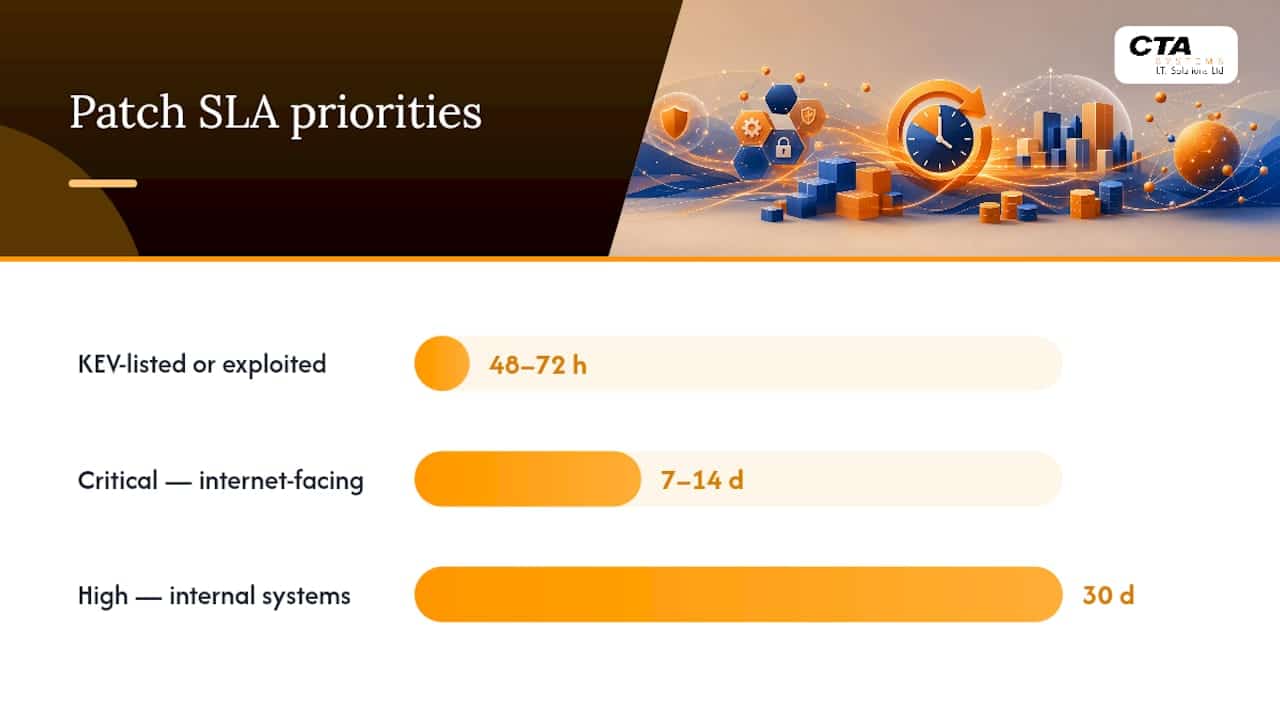
Turn that model into service-level agreements your team can act on without debating each time:
- KEV-listed or actively exploited vulnerabilities: patch within 48 to 72 hours.
- Critical severity on internet-facing systems: 7 to 14 days.
- High severity on internal systems: 30 days.
Feed KEV, the National Vulnerability Database (NVD), and threat intelligence feeds directly into your triage automation so these SLA clocks start the moment a vulnerability is published, not when someone gets round to reading the report.
How do you stage patch deployments without breaking production?
A three-ring model gives you a safety net without slowing deployment to a crawl. The validation ring expands to 25 to 35% of the fleet, usually one department or site, held for another few days. The remainder gets the patch once both earlier rings show a clean bill of health.
- Deploy to the pilot ring and monitor crash rates, application error logs, and helpdesk tickets for anomalies.
- Set clear promotion gates: no rollback triggers, no spike in errors, no unresolved user complaints, before moving to validation.
- Expand to validation ring and repeat the same monitoring criteria over a longer hold period.
- Promote to the remaining fleet once validation clears, and keep a fast rollback path open throughout.
Rollback only works if you’ve actually rehearsed it. Run rollback drills quarterly, not just when something has already gone wrong. NIST’s practice guide examples show reference architectures where rollback and isolation are built into the deployment pipeline from the start, not bolted on after an incident.
What should you automate, and where does Windows hotpatch fit?
Automate discovery, scheduling, retries, ring enforcement, and reporting. Keep exception approvals and rollback judgement calls with a human who understands what’s actually running on that server.
- Automated scanning that feeds straight into ticketing removes the manual handoff that slows most remediation workflows down.
- Ring enforcement should be automatic, not a checklist someone remembers to follow.
- Reporting dashboards should update themselves, not require a monthly manual pull.
- Exception approvals stay manual. A machine shouldn’t decide that a legacy system gets another 90 days unpatched.
Hotpatch, part of Windows Autopatch, lets eligible devices install monthly security updates without a restart. Microsoft’s own documentation on configuring hotpatch shows it can help organisations reach high compliance standards in significantly less time compared with standard patching, when device prerequisites are met. Those prerequisites matter: devices need virtualisation-based security (VBS) enabled and must sit on an eligible baseline release. If your fleet doesn’t meet those conditions, hotpatch isn’t available to you yet, and that’s worth checking before you plan around it.
Pro Tip: Run a hotpatch eligibility audit before your next budget cycle. Devices that qualify can skip a full reboot cycle every month, which adds up fast across a few hundred endpoints.
What do you do with systems you can’t patch?
Every environment has at least one system that can’t be patched on schedule: legacy line-of-business software, an appliance the vendor abandoned, a device that fails if it reboots mid-shift. The answer isn’t to ignore it. It’s to wrap it in compensating controls.
- Isolate the asset on its own network segment with strict access control lists.
- Add web application firewall (WAF) rules if it’s a web-facing service.
- Reduce its blast radius: limit what it can talk to and who can reach it.
- Change configuration temporarily to close the specific attack path, even if you can’t close the vulnerability itself.
For genuine emergencies, run an expedited process: confirm exploitation is credible, apply compensating controls immediately, then patch through an accelerated SLA rather than the standard queue. Every exception, patched or not, needs a named owner, a time-boxed acceptance period, and a review date. An exception with no expiry date is just a vulnerability you’ve agreed to stop thinking about.
How do you measure whether your patch programme is working?
Four metrics tell you almost everything auditors and your own team need to know:
- Time-to-patch for critical vulnerabilities, measured from disclosure or SLA start to confirmed deployment.
- Per-device compliance rate, not just a fleet-wide average that hides stragglers.
- Mean age of unpatched high and critical CVEs across the estate.
- Number of active exceptions, each with a documented expiry date.
Report compliance per device with a named owner and a ticket reference, not as a single fleet-wide percentage.
Auditors want to see traceability: which device, which vulnerability, which ticket, which patch, which date. A dashboard that shows trend lines for time-to-patch and compliance rate, alongside a live exception list, covers most audit requests without anyone scrambling to build a report from scratch.
Who owns patching, and what belongs in your policy?
Patch management fails most often from unclear ownership, not from missing tools. Split roles clearly:
- Security owns vulnerability intelligence and risk scoring.
- IT operations owns deployment, testing, and rollback execution.
- Service owners own the maintenance groups their assets sit in.
- Change Advisory Board (CAB) approves exceptions and emergency changes outside normal SLAs.
Your policy document needs SLAs by severity, an exception process with mandatory expiry dates, defined maintenance windows per group, ring promotion gates, and a commitment to rollback drills on a set schedule.
- Days 1 to 30: build a complete asset inventory and assign maintenance groups.
- Days 31 to 60: implement risk-based SLAs and automate discovery and reporting.
- Days 61 to 90: run your first rollback drill and publish per-device compliance dashboards.
What are the most common patch management mistakes?
Findings with no assigned owner die quietly in a spreadsheet. Duplicate scanning tools report the same vulnerability under two different names, wasting triage time. Teams that never rehearse rollback discover, mid-incident, that nobody actually knows how.
Three quick wins fix most of this fast:
- Patch internet-facing critical vulnerabilities first, before anything else on the backlog.
- Automate workstation patching so routine updates stop competing for your team’s attention.
- Enforce per-device compliance reporting so gaps show up before an auditor finds them.
Keep a one-page checklist on hand for operational meetings: current KEV exposure, pending exceptions and their expiry dates, this week’s ring promotions, and last quarter’s rollback drill result.
What patch management actually looks like once you’ve run it for a few years
The theory of patch management is clean. The reality is messier, and most of the friction isn’t technical. It’s cultural. Teams resist maintenance windows because a past patch broke something, so they push deployment further out, which increases exposure, which makes the next incident worse when it inevitably happens. Breaking that cycle takes more discipline than tooling.

For SMEs specifically, the achievable first step isn’t buying a new platform. It’s building the asset inventory properly and assigning real ownership to every device group. That alone surfaces most of the risk hiding in “we’ll get to it eventually” territory.
Grouping assets by maintenance tolerance rather than device type, an approach echoed in continuity planning guidance for logistics operations, consistently produces fewer surprises than grouping by department or location.
— Will
Managed patching without the internal overhead
Most SMEs don’t have the spare headcount to run ring-based deployments, rollback rehearsals, and per-device compliance reporting on top of everyday IT support. Managed patching services provide direct access to technicians familiar with your systems, rather than a ticket queue that starts from zero every time.

Managed IT Support from Ctasystems covers exactly the workflow this article describes: asset discovery, risk-based prioritisation, staged deployment, and audit-ready reporting, delivered proactively rather than after something breaks. Remote Monitoring & Management handles the automation layer, catching failed deployments and compliance gaps before they become incidents. If you want predictable monthly costs instead of unplanned emergency call-outs, the Care Plans structure is built for that, alongside Microsoft 365 management for the update cycles specific to that platform.
Get in touch with Ctasystems to talk through where your current patch coverage has gaps, and what a fixed monthly plan would look like for your fleet.
Where to check the details yourself
- NIST SP 800-40r4 sets out the enterprise patch management framework this article draws its core recommendations from, including maintenance groups and phased deployment.
- NIST SP 1800-31 shows practical reference architectures for inventory, prioritisation, and handling unpatchable systems.
- Microsoft’s hotpatch documentation covers eligibility requirements and configuration for rebootless Windows updates.
- The National Vulnerability Database is the primary source for CVE data feeding exploitability scoring.
Sources
- Configure hotpatch – Microsoft Intune
- NIST SP 800‑40r4: Guide to Enterprise Patch Management Technologies
- NIST SP 1800‑31: Improving enterprise patching for general IT systems
- Patch management best practices: Reduce risk faster – Kaseya
FAQ
What is the best patch management strategy?
The most effective strategy combines risk-based prioritisation with automation and clear SLAs by severity. Rank vulnerabilities by exploitability and exposure rather than CVSS score alone, automate routine deployment tasks, and stage rollouts through pilot and validation rings before going fleet-wide.
What are general guidelines for patch management?
Maintain a complete asset inventory, prioritise by real-world risk, test patches in stages before full deployment, and document exceptions with expiry dates. NIST SP 800-40r4 recommends organising assets into maintenance groups, each with its own documented maintenance plan.
What is a good patch management solution?
A good solution automates discovery, scheduling, and reporting while keeping exception decisions with a human. Managed services such as Ctasystems’ Remote Monitoring & Management combine that automation with proactive monitoring, which suits SMEs without a dedicated patching team.
What are the NIST guidelines for patch management?
NIST’s SP 800-40r4 treats patching as mandatory preventive maintenance and recommends asset inventories, maintenance groups with individual plans, phased deployments, and automation wherever possible. SP 1800-31 adds practical reference architectures for implementing that guidance, including isolation methods for systems that can’t be patched.
How much does managed patch management cost?
Pricing depends on fleet size and the level of support required, so it isn’t published as a flat rate. Current details are available directly from Ctasystems.


